Cisco Live AMER 2026: Never underestimate Cisco Live!

Original Entry by : Stephen Donnelly

By Dr Stephen Donnelly, Chief Technical Officer, Endace


Dr Stephen Donnelly, CTO, Endace

Cisco Live AMER is a huge event, attracting more than 20,000 attendees to see the latest products, technology, and innovations from Cisco and its partners. In 2026, Cisco Live AMER had a dedicated SOC for the second time, out on the main show floor for everyone to see. The SOC mission is threefold:

  • To Protect: The primary goal of the SOC is to protect attendees, partners, and staff using the Cisco Live network from threats from outside or within the network
  • To Educate: The SOC educates attendees about modern Agentic SOC operation, current threats, and best practices. Over a dozen new analysts were trained in the SOC, empowered by agentic workflows.
  • To Innovate: The live environment is an opportunity to pressure test how Cisco Security, Splunk Security, and Endace can work together in a next-generation SOC where AI assists, evidence grounds the decision, and humans remain in control

Endace (a Cisco Solutions Plus Partner) was invited to collaborate in the SOC again this year.

We have a great relationship with the SOC team and have assisted at multiple events by providing our always-on full packet capture capability. Capturing all the network traffic at the event not only provides incontrovertible evidence to confirm incident investigations but allows SOC analysts to ‘zoom out’ from a single alert to see the full context of the event.

Visibility of the network activity before and after an incident helps determine the attack chain, and any indications of compromise, such as malware downloads, C2 beaconing, reconnaissance, or lateral movement. A complete record of traffic for the event also enables systematic threat hunting, as well as providing the ability to help train AI on real-world traffic for the Agentic SOC.

The SOC dashboards on show outside the Cisco Live USA 2026 SOC
The SOC dashboards on show outside the Cisco Live AMER 2026 SOC

Endace’s Always-On Packet Capture

To capture all the traffic at the event, Endace supplied two EndaceProbe appliances for use in Cisco’s ‘SOC-in-a-Box’. Each capture appliance features 100 Gigabit Ethernet capture interfaces and NVMe storage, capable of sustained capture at 100Gbps. Each appliance also supports multiple virtual machines which have access to the live captured data in real-time and can host analytics tools. An Endace InvestigationManager VM provides federated search across both appliances, with integrations for Cisco XDR and Splunk, and an MCP server for AI agents.

As incidents are raised in XDR or Splunk Enterprise Security, they are automatically enriched with links to the Endace InvestigationManager. These links allow AI agents and SOC Analysts to easily access full PCAP captures for the related traffic, or pivot to wider searches as needed.

Cisco's SOC-in-a-Box, used at a wide range of events globally.
Cisco’s SOC-in-a-Box, used at a wide range of events globally, is installed in the Cisco Live NOC.

How much is enough?

At 2025 Cisco Live AMER in San Diego, the EndaceProbes captured a total of 78.9TB of network data during the whole event: a record volume of traffic at the time. We expected 2026 to be even bigger, so we configured 160TB of packet storage across the two appliances.

Full packet capture started as soon as the SOC was stood up on the Friday before the show, capturing the network traffic as the show floor and booths were constructed. By the end of the second full day of Cisco Live we had already captured 100TB, and it was looking like our 160TB allocation might be insufficient. This would have meant overwriting traffic captured at the start of the event, so we reconfigured the storage to increase the total packet storage to 192TB. Metadata and search indexes are on top of this figure, allowing retrieval of any captured flow in seconds.

By the end of the show, the EndaceProbe appliances had captured more than 200 billion packets, consuming 199TB of storage, without dropping any packets from the SPAN or overwriting any data since the start of the event. How was that possible with only 192TB of storage configured?

The EndaceProbe appliances support hardware compression of packet data prior to storage. Of the 199TB of traffic collected, 37% was unencrypted, which compresses well. The overall compression ratio for the packet data was 1.25:1, so our 199TB of traffic consumed only about 159TB of storage space. Our original 160TB configuration was pretty close after all!

A dashboard at Cisco Live USA 2026 shows Endace statistics for the show's duraction.
A dashboard at Cisco Live AMER 2026 shows Endace statistics for the show’s duraction.

Why was so much traffic unencrypted, isn’t it a security risk? In some cases yes, the SOC detected 685 unique accounts exposing login credentials in the clear, mostly because of misconfigured email clients using SMTP, IMAP, and POP3 without encryption. The SOC even automated a playbook to contact affected users and warn them of their exposure, inviting them to the SOC for a demonstration and help with remediation.

A surprising amount of traffic still uses unencrypted http. This is commonly used for downloading unencrypted (but signed) software update packages such as Microsoft .cab and Android .apk files, plus EDR rule updates etc. The contents of these files are freely available and frequently cached so transport encryption is not necessary, provided package signatures are verified to confirm authenticity.

The Cisco Live SPAN was configured to capture not only the attendee WiFi network, but also a large amount of infrastructure traffic including CiscoTV, one of the largest users of the network. Some of that traffic was also unencrypted, such as syslog data from IDS appliances. This also contributed to the relatively high percentage of unencrypted traffic seen.

Packet Loss

If the EndaceProbe appliances captured all the traffic from the SPAN without drops and did not overwrite any data, did we get everything? Looking at the bandwidth arriving on the 10GE SPAN port the traffic was reaching 10Gbps early in the day, suggesting the SPAN may be saturated and dropping. Without access to the SPAN port statistics this can be difficult to quantify, but one approach is to look at the sequence numbers seen in TCP flows.

Analyzing traffic flows from Cisco Live USA 2026 in InvestigationManager
Analyzing traffic flows from Cisco Live AMER 2026 in InvestigationManager

When a TCP flow encounters packet loss in the network, a retransmission will occur to fill in the missing data. When this flow is captured by analysis tools they may or may not see the initial lost packet, but they can see the retransmission and infer the loss. Conversely, if the analysis tools see many TCP flows with missing segments but no retransmissions, this can indicate multi-path routing (not applicable at Cisco Live), or packet loss at the SPAN port.

Examining these indicators showed estimated packet loss exceeding 30% during peak times, or around 13-14Gbps of traffic. This could be easily solved in future by upgrading the SPAN port to 25G or 40G Ethernet, a definite learning opportunity.

File Reconstruction

The EndaceProbe appliances also extracted files from unencrypted connections. Over Cisco Live Americas 2026 a total of 2,392,180 files were extracted. These files were filtered by type and deduplicated, with 23,368 submitted to Splunk Attack Analyzer and 5,427 to Cisco Secure Malware Analytics for deeper inspection.

Examining the rate of file extraction over time, we noticed it did not follow the overall bandwidth curve. This is counterintuitive, as more files should be transferred and extracted as the network bandwidth increases during the day.

This anomaly may be caused by the SPAN being overloaded and dropping packets before they reached the EndaceProbes. Files cannot be successfully reconstructed and extracted when packets are lost, and a packet loss rate exceeding 10% implies that most file transfers would have at least one packet missing. With a higher bandwidth SPAN to the SOC we are confident the file extraction counts would have been significantly higher.

Conclusion

Never underestimate Cisco Live! We will be back next year with a faster SPAN and more storage to support the SOC in 2027 (and at Cisco Live APCJ in Melbourne this November), helping protect, educate, and innovate. Hope to see you there!

Acknowledgements

Our thanks go to the Cisco SOC team, led by Jessica Oppenheimer and Ivan Berlinson, for the opportunity to integrate EndaceProbes with the Cisco Live Agentic SOC architecture. 

The SOC team is a collection of Cisco and Splunk experts across many domains who were a pleasure to work and innovate with, and we came away with a great appreciation for the power of the Cisco Security and Splunk tools.

The Endace and Cisco teams were able to prove out integration innovations and test them in earnest in a real-world environment in preparation for making them generally available to the market.

More from Endace, Splunk and Cisco in the SOC series

Read more from Endace about the Cisco Live USA 2026 SOC:

Read related Cisco Team Blogs from the Cisco Live USA 2026 SOC: 
https://blogs.cisco.com/security/clamer-soc-2026

For more Endace blogs in our SOC series, see here:
https://blog.endace.com/tag/soc/ 

Event SOC Website 
Visit Cisco’s Event SOC website for full details of the SOC setup, and download the whitepaper written by Jessica Oppenheimer:
https://www.cisco.com/site/us/en/products/security/event-soc-report.html


Cisco Live AMER 2026: Using LLMs and Endace Full Packet Capture for Incident Response

Original Entry by : Barry "Baz" Shaw

By Barry “Baz” Shaw, Senior Engineering Manager, Technology Partner Programs, Endace


Barry

At Cisco Live AMER 2026 Endace debuted an MCP (Model Context Protocol) server for the integration of EndaceVault into the emergent agentic Security Operations Center (SOC), providing access to 200TB of full packet data and on-demand packet analysis to all agents present in the SOC.

Going into Cisco Live we had key questions about the utility of PCAP data to agents, how to manage making terabytes of data available without overflowing their context windows, and whether the models could parse, analyze and make judgements from the PCAP data comparable to that of an analyst. Results from some simple tests are extremely encouraging and indicate a bright future for agentic AI in the SOC.

Endace Always-on Packet Capture

Two of Endace’s newest EP94C8 EndaceProbes were installed in the GovWare SOC to provide full packet capture to support the conference SOC directives of Protect, Educate, and Innovate.  Full packet capture provides unique insight into all activities on the network, delivering critical context and evidence for Incident Response and Threat Hunting teams.

The EndaceProbes each hosted three VMs that were running Zeek and delivering critical log data into Splunk.  Custom Zeek script additions provided additional valuable details around clear text passwords in email and HTTP, and the use of insecure protocols.  Zeek was also used for file-carving and automated submission of objects to Splunk Attack Analyzer and a beta of Endace’s new Vault API used in a Cisco XDR automated workflow was field tested.   

PCAP and AI – a key question answered

In this scenario we wanted to test the ability of a reasonably new on-prem model to make incident judgements based on PCAP data.  Using the qwen-3.6 model and Open WebUI, a DNS buffer overflow attempt flagged by Cisco Secure Firewall, and raised as an incident in Cisco XDR, was chosen as the candidate.

Cisco Live USA 2026: Possible Buffer Overflow Attempt Flagged
Cisco Live AMER 2026: Possible Buffer Overflow Attempt Flagged

Using the Endace XDR workflow integration (which automatically creates Endace Pivot-to-Vision and EndaceVault links directly in the worklog) a quick pivot from Cisco XDR to EndaceVision shows DNS traffic present:

Investigating the suspect DNS traffic in EndaceVision

After pivoting from EndaceVision into Wireshark, we can see DNS activity and some large query responses.  This verification served as the analyst judgement to be compared with the LLM findings.

Examining the actual packets in Wireshark lets us validate the AI agent's analysis.
Examining the actual packets in Wireshark lets us validate the AI agent’s analysis.

In Open WebUI a new chat was opened, the Endace MCP connected as a tool, and the following prompt was issued:

There was a firewall alert called ‘PROTOCOL-DNS Microsoft SMTP excessive answer records buffer overflow attempt’ recorded for the traffic between IP addresses <redacted> and <redacted> at 2026-06-03T15:24:01.000Z and 2026-06-03T15:22:33.000Z. Can you get a packet decode from Endace and either confirm or deny the existence of DNS responses that would match this alert.

The model’s reasoning is shown in the following screenshot:

The AI agent's reasoning before starting the analysis.
The AI agent’s reasoning before starting the analysis.

The Endace MCP tools contain detailed annotations that provide context to the model. Above we can see this context helping the model choose between different time inputs and correctly identifying that the start and stop times provided in the prompt were (accidentally) transposed in the prompt.

The AI agent prepares to retrieve and analyze the packet data.

Once the AI issued the tool call to the Endace Vault API via the MCP, the extraction of the related PCAP data began. To make this data more consumable by AI, it is converted to JSON by the Endace Vault API and streamed back in manageable sized chunks. The AI can request additional chunks as required, which protects the context window from being swamped by a large PCAP download.

An example of the returned JSONified PCAP data is shown below, this is the raw data that the AI has to make its determination.

A sample of the packet data returned in json format

After consuming the JSONified PCAP data the AI began its analysis, clearly having parsed the PCAP data and displaying an understanding of the DNS protocol. From the name of the alert, it understood the specific details pertaining to the alert and was able to look for these in the DNS packets:

The AI agent shows its reasoning and the resulting analysis.
The AI agent shows its reasoning and the resulting analysis – Part 1.
The AI agent completes its analysis and outlines its conclusion.
The AI agent shows its reasoning and the resulting analysis – Part 2.

The reasoning of the model makes for interesting reading. It can comprehend the nature and specifics of the alert and use this to reason about the DNS packets.  It successfully found an oversized DNS response and provided unprompted enrichment by determining the hosting provider of the DNS server.

The AI Agent completes its analysis and outlines its conclusion.

So far, the model has performed admirably, validating the firewall alert and the analyst judgement.  To take things further, we asked the model to do some extra analysis over and above the human analysis we’d done. While this chat was user driven, we expect that this is the kind of autonomous activity AI agents will perform on their own.

The AI was asked to confirm the hosting provider and look at the contents of the large DNS response to determine if it contained a malicious payload or was in fact just a verbose and unusually large response.

Can you confirm that the destination host <redacted> is in fact Microsoft hosted?  Is there anything in the large DNS response that could be malicious or is it just a DNS response?

The AI Agent elaborates on its initial conclusion when asked for additional analysis.

The model has told us that the source of the DNS response is a reputable domain and that the payload of the response was just a large number of regular AAAA records.  In a pre-AI SOC, the analyst would need to spend time inspecting the PCAP in Wireshark (if they had access to full packet capture in the first place) to determine this was a false positive.

Conclusion

While this example was intentionally not an autonomous agentic finding, the model was able to determine that this alert was a false positive by analyzing the PCAP.  The fact that relatively small open-source models can successfully extract findings from PCAP data is a major validation of their utility in the agentic SOC. We expect that frontier models will provide even richer analysis of PCAP data when available in the SOC if the token cost can be justified. A possible architecture is an on-prem first approach, escalating to a frontier model in the event on-prem cannot make a confident determination.

By using an agent to investigate events like these, and having access to full PCAP data, alerts can be triaged by the agent, requiring only a cursory review by a human analyst to definitively close cases in record time. This validates the core concept that the agentic SOC will improve overall efficiency and accuracy by optimizing incident triage and freeing up time for analysts to work on the more complex incidents that threaten enterprise operations.

Acknowledgements

Our thanks go to the Cisco SOC team, led by Jessica Oppenheimer and Ivan Berlinson, for the opportunity to integrate EndaceProbes with the Cisco Live Agentic SOC architecture. 

The SOC team is a collection of Cisco and Splunk experts across many domains who were a pleasure to work and innovate with, and we came away with a great appreciation for the power of the Cisco Security and Splunk tools.

The Endace and Cisco teams were able to prove out integration innovations and test them in earnest in a real-world environment in preparation for making them generally available to the market.

More from Endace, Splunk and Cisco in the SOC series

Read more from Endace about the Cisco Live USA 2026 SOC:

Read related Cisco Team Blogs from the Cisco Live USA 2026 SOC: 
https://blogs.cisco.com/security/clamer-soc-2026

For more Endace blogs in our SOC series, see here:
https://blog.endace.com/tag/soc/ 

Event SOC Website 
Visit Cisco’s Event SOC website for full details of the SOC setup, and download the whitepaper written by Jessica Oppenheimer:
https://www.cisco.com/site/us/en/products/security/event-soc-report.html


Cisco Live USA 2026: Supporting Encryption vs. Using Encryption – when the best laid plans go astray

Original Entry by : Elliott Hinson

By Elliott Hinson, Integrations Engineer, Endace


Elliot Hinsen, Integrations Engineer, Endace

Are you actually using encryption, or does your software simply support it?

The answer may seem silly, but there lies a hidden amount of complexity behind this question that many users never have the need or opportunity to approach.

At the Cisco Live USA 2026 Security Operations Center (SOC) we found a great number of instances of users using technology that supported encryption. However, through some form of misconfiguration or a sheer lack of knowledge, they had configured their system to not use the encryption that their software did, in fact, support.

Sony DSLR FTP uploads

The first incident that I would like to discuss regards a user operating a Sony DSLR camera with automated photo upload enabled. Most DSLR cameras these days offer a Wi-Fi or Bluetooth connectivity option to offload photos for later processing.

While sifting through log data in Splunk, we discovered one user at the conference had configured automated image uploading to an FTP server in the cloud directly from their Sony DSLR camera.

Because this was configured to an FTP cloud server, and because we had the full packet data recorded via the EndaceProbe, we were able to inspect the username and password for the login credentials of this FTP server, which were being broadcasted in the clear over the network. Furthermore, thanks to Endace’s file carving ability, we were even able to reconstruct the original file uploads that the user had sent to the cloud over the Wi-Fi network, also unencrypted.

This represented one of the lower risk level incidents of supporting encryption without using encryption because the photos were intended to be used at the Cisco Live Conference, and they were not particularly private. One could imagine an incident, however, where much more private photos had been taken on a similar camera system, and those photos could be gathered by any nefarious actor with access to the Wi-Fi network.

This problem is particularly unfortunate, since a quick perusal of the Sony documentation for that particular model of camera shows that they very clearly do support encryption in the form of SFTP or FTPS. However, the user had not configured these and was unaware that they had been uploading their photos and password in the clear all week.

Recorded data upload dates and times shown in EndaceVision.
Extracted images were reassembled from the packet data using Zeek.

POP3 email, using the wrong port

This flavor of incident resulted in several users being invited into the SOC for us to inform them of the dangers of using unencrypted email. The POP3 protocol, as well as the SMTP protocol, do support encryption. However, once again we found users were connecting to their email servers with mail clients that had not been configured to enable encryption. It had merely asked them for a port number, and the user, not knowing which port number to use or why that may be important, had simply selected the default.

This was quite convenient for us, since their username for their accounts was their email address (and their email login password was also exposed). So, all we had to do was use the email address that we had seen passing, unencrypted, over the network to send them an email inviting them to the SOC to improve their security posture. For one of the users, it was as simple as changing the mail client to use the POP3 port that supported encryption.

This represented a much higher risk level of incident, since not only was the username and password for their email accounts in the clear, but we could also reconstruct emails for several users with this problem. That allowed us to uncover an additional problem. Some of these users were using a network monitoring solution that also did have encryption enabled and was sending email reports containing sensitive information about the state of their laptop computers in the clear. The issue was fixed by digging through a nested menu to check a box that enabled encryption.

What was interesting was that this network monitoring software was attempting to send unencrypted email reports to service providers that were actually returning error codes indicating that they did not support receiving unencrypted email. However, while the service providers were attempting to stop this unencrypted email system from being received, this did not preventing the user’s client software from sending their username and password in the clear for anyone to see.

Almost encrypted office-suite

This next incident was particularly tragic because of how much effort the user had clearly put into attempting to ensure their security by supporting encryption at multiple layers of their software stack.

Once again sifting through Splunk logs and corroborating those Splunk logs with the original packet data – available to us from the EndaceProbe in the Cisco Live SOC – we discovered a user who had configured a self-hosted Office 365 alternative on their Android smartphone so they could synchronize and manage contacts, images, and important documents using a self-hosted office suite server.

Initially, we thought this was a case of some user setting up an office suite on a home network and port forwarding that instance to the open internet using their home router. This obviously is not a recommended way to expose a private service to a remote user, but is still very commonplace due to users not fully understanding the risks of such a setup.

In this case, however, upon further inspection we discovered this office suite server was running behind a Cloudflare TLS termination gateway. We also saw that encryption for the WebUI had been configured correctly so attempts to access a non-encrypted version of the login page would automatically redirect to the encrypted page.

The one weak link in the system was that this particular Android client had been configured to use the unencrypted webDAV endpoint and was not following redirects because it was not a full web browser.  It was at this point that we realized, tragically, that we were observing a user who:

  • had properly put their self-hosted office suite system behind a Cloudflare DDOS protection gateway
  • had properly configured TLS for the service
  • had properly HTTPS redirection in place.

However, since they did not have port 80 configured to only allow HTTPS redirection and not allow any other access to the services via port 80, and because the android client was defaulting to using port 80 but not being redirected, the user was leaking sensitive credentials and business information for anyone to see.

Authentication data transmitted in the clear because of a simple, overlooked, mis-configuration.

Conclusion

To wrap all this up, and provide a moral to this collection of stories: just because your software stack supports encryption does not guarantee that it is necessarily using that encryption. You have to make sure that all software is configured correctly to be using the encryption that it will most likely already support. Furthermore, most firewalls and security systems won’t flag unencrypted traffic as it is not necessarily malicious nor is it inherently risky to the network operator.

The only way we discovered this was thanks to the use of Splunk logging and its integration with Endace’s always-on packet capture system. This allowed us to reconstruct the full packets for these incidents – which a smart PCAP system or a firewall triggered PCAP system would never have seen.

Acknowledgements

Our thanks go to the Cisco SOC team, led by Jessica Oppenheimer and Ivan Berlinson, for the opportunity to integrate EndaceProbes with the Cisco Live Agentic SOC architecture. 

The SOC team is a collection of Cisco and Splunk experts across many domains who were a pleasure to work and innovate with, and we came away with a great appreciation for the power of the Cisco Security and Splunk tools.

The Endace and Cisco teams were able to prove out integration innovations and test them in earnest in a real-world environment in preparation for making them generally available to the market.

More from Endace, Splunk and Cisco in the SOC series

Read more from Endace about the Cisco Live USA 2026 SOC:

Read related Cisco Team Blogs from the Cisco Live USA 2026 SOC: 
https://blogs.cisco.com/security/clamer-soc-2026

For more Endace blogs in our SOC series, see here:
https://blog.endace.com/tag/soc/ 

Event SOC Website 
Visit Cisco’s Event SOC website for full details of the SOC setup, and download the whitepaper written by Jessica Oppenheimer:
https://www.cisco.com/site/us/en/products/security/event-soc-report.html


Cisco Live Amsterdam 2026: IPv6’s Time is Finally Here, for Users and Threat Actors Alike

Original Entry by : Cary Wright

By Cary Wright, VP Product, Endace


Cary Wright, VP Product Management, Endace

Cisco Live Amsterdam 2026: IPv6 is finally here, along with the threats

At each SOC event, we capture and inspect every packet from start of show through to the very last hour, for the purpose of securing the attendees and conference, wiping the data at the end. This gives us a rare opportunity to understand how the traffic trends and threat landscape are changing. Each SOC event shows us new data and developing trends that are useful to dig into. The week of Cisco Live EMEA, we got to see a milestone with the transition to IPv6.

The Internet has technically been out of IPv4 addresses for years, yet global adoption of IPv6 — the modern protocol designed to replace it — continues to climb slowly. As of late 2025, worldwide IPv6 usage sits at roughly 49%, based on Google’s traffic metrics.  While several countries have made remarkable progress, the global transition remains uneven and far behind early expectations.

Why IPv6 Matters

IPv4’s roughly 4.3 billion available addresses are nowhere near enough for today’s hyper‑connected world. In contrast, IPv6 offers a 128‑bit address space, providing 3.4 x 1038 possible addresses — more than enough for decades of growth.  Technologies like Network Address Translation (NAT), private addressing, and CIDR have extended IPv4 far beyond its natural lifespan. These workarounds give organizations a false sense that IPv4 is still sufficient, reducing the urgency to adopt IPv6.

What we observed in Amsterdam

In the Cisco Live EMEA SOC, we inspected 130 billion packets across 32,434 unique IP endpoint devices at the conference, using Splunk to query unique DHCP Client IDs to measure. These included devices connecting to the Wi-Fi and wired networks at the Cisco Live conference network, including attendee laptops, phones, and conference devices such as demo stations, cameras, IOT devices, displays, networking equipment, and any other IP connected device.

Of this traffic, 62% of the data travelled over IPv6, and only 38% over IPv4. This represents a tectonic shift in the move to IPv6. Perhaps this was because we were sitting just a few miles from the Regional Internet Registry for Europe, Middle East and Central Asia (RIPE NCC), or more likely this is because the world is finally ready and moving to IPv6.

Our heaviest day was Tuesday, with 25,609 devices that connected to the network.

Across all this traffic we observed 1.7 million unique IP addresses, most of which were external addresses accessed by attendees and conference devices. Those IP addresses were made up of 386,397 IPv4 addresses, and 1,339,329 IPv6 addresses.

Threat Actors — adopting IPv6 faster than anyone

In the SOC, we have no shortage of data to interrogate, interrogating our Splunk data highlight that threat actors are now heavily favoring IPv6 to conduct their attacks, hijack resources, or compromise systems.  Over 99% of malicious URLs and crypto miners used IPv6, telling us that we need to ensure we properly secure our IPv6 infrastructure. Just 1% of our attacks involved IPv4. That indicates a trend that we all need to take notice of.

Splunk search of incidents at Cisco Live EMEA 2026
A Steady Shift — But an Inevitable One

Although the transition has taken decades, IPv6 momentum appears to have crossed an important threshold. With increasing digital demands, rising IPv4 costs, and rapidly expanding device ecosystems, IPv6 isn’t just beneficial — it’s essential.

The future of the Internet is unquestionably IPv6. The challenge now is how quickly the world can get there, and how well we secure it. At Cisco Live EMEA, we saw the world has taken a large and important step forward.

Acknowledgements

This important insight to IPv6 adoption would not have been possible without the great work done by the Cisco Live EMEA SOC team, led by Jessica Oppenheimer and Ivan Berlinson.

Data collected and analyzed was the result of a team, many thanks go to the following team members:

Network Operations Center Liaisons

Cisco Security and Splunk SOC Team

Endace SOC Team

Read related Cisco Team Blogs from the Cisco Live Europe 2026 SOC: 
https://blogs.cisco.com/security/emea-soc-2026

For more Endace blogs in our SOC series, see here:
https://blog.endace.com/tag/soc/ 

Event SOC Website 
Visit Cisco’s Event SOC website for full details of the SOC setup, and download the whitepaper written by Jessica Oppenheimer:
https://www.cisco.com/site/us/en/products/security/event-soc-report.html


Cisco Live Amsterdam 2026: Back in the SOC after a 10-year hiatus

Original Entry by : Owen Gallagher

By Owen Gallagher, Senior Sales Engineer, Endace


Overview

This year, I had the opportunity to work in a Security Operations Centre (SOC) for the first time in over a decade, at Cisco® Live Amsterdam. I joined the team responsible for monitoring and responding to incidents on the public Wi‑Fi network.

Cisco builds a fully operational SOC at each Cisco Live event, using tools from Cisco, Splunk and Endace to secure the environment. The team is a mix of engineers and analysts from all three companies, with experience ranging from first‑time responders to L3 (also known as Tier 3) analysts. Even though many of us had never worked together before, the teamwork was excellent. Everyone shared knowledge, helped each other understand different technologies and supported one another during investigations.

Because this was my first SOC shift in over 10 years, it took a little time to get into the rhythm of moving from a Cisco XDR Incident notification, gathering evidence, and deciding whether to close or escalate an incident. But after working through a full investigation, things started to click again.

One incident in particular stood out, so I’ll walk through the workflow and how we reached our conclusion.

The Notification

Cisco XDR® reported suspicious activity: a suspicious IP response from an external host. My first task was to understand what this external IP address was and which internal devices it had communicated with on the Wi‑Fi network. The screenshots below show how the alert appeared in Cisco XDR, including the details provided in the incident description.

Identifying the External IP

I used Talos® Intelligence to look up the IP address. Talos showed that the IP was untrusted and already on the block list, which immediately made the incident more important to investigate.

Checking Internal Communication

Next, I moved into Splunk®. By filtering logs from the Cisco Secure Firewall® (running in passive mode), I could see that the suspicious IP had communicated twice with two internal assets. Based on the address range, these devices were on the wireless network.

The logs also showed that, if the firewall had been in active mode, this traffic would have been blocked. The protocol involved was ICMP, meaning these were ping requests.

At this point, I knew what happened and which devices were involved. But I still needed to confirm whether the pings were successful and what the actual packets looked like.

Verifying with Packet Capture

To answer those questions, I turned to Endace, which records all network traffic. Using EndaceVision™, I generated a visualization that showed two 64‑byte packets exchanged between the external IP and the two internal devices. This matched what Splunk was showing.

To dig deeper, I pivoted into Wireshark™, hosted on EndaceProbe™, to inspect the raw packets. Wireshark confirmed two‑way ICMP communication, which gave us the evidence we needed to document the incident accurately

Escalation

I gathered screenshots, packet details and log information and documented in my report in the  XDR Incident Worklog. Because this was confirmed communication with an untrusted IP, I escalated the incident to the network team for a perimeter firewall review and to ensure that the IP address was added to the block list. 

Final Thoughts

This incident reminded me how important full packet capture is. Logs show that something happened, but packets tell you exactly how it happened and give you the confidence to take the right action.

Working in the Cisco Live SOC after so many years away from this environment was a rewarding experience. The collaboration, the technology and the live investigations made it a great week, and it reinforced why SOC work is so valuable: you get to protect real users in real time and understand the network at a level you can’t get anywhere else.

Acknowledgements

My experience at this event would not have been possible without the great work done by the Cisco Live EMEA SOC team, led by Jessica Oppenheimer and Ivan Berlinson.

Data collected and analyzed was the result of a team, many thanks go to the following team members:

Network Operations Center Liaisons

Cisco Security and Splunk SOC Team

Endace SOC Team

Read related Cisco Team Blogs from the Cisco Live Europe 2026 SOC: 
https://blogs.cisco.com/security/emea-soc-2026

For more Endace blogs in our SOC series, see here:
https://blog.endace.com/tag/soc/ 

Event SOC Website 
Visit Cisco’s Event SOC website for full details of the SOC setup, and download the whitepaper written by Jessica Oppenheimer:
https://www.cisco.com/site/us/en/products/security/event-soc-report.html
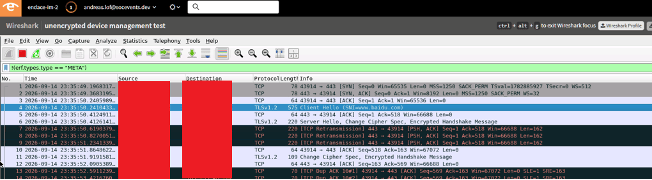

Cisco Live Amsterdam 2026: Malicious trojan file sent over POP3 email

Original Entry by : Sundarram Paravastu

Sundarram Paravastu, Principal Software Engineer, Endace


Overview

At each Security Operations Center (SOC) event, we capture and inspect every packet from start of show through to the very last hour, for the purpose of securing the attendees and conference, wiping the data at the end.

We had two of Endace’s newest EP94C8 EndaceProbes™ doing full packet capture providing unique insight into all activity on the network, delivering critical context and evidence for Incident Response and Threat Hunting teams. As part of the setup, we also had Application Dock VMs running on the EndaceProbes, extracting files where possible from unencrypted traffic, and sending rich metadata and Zeek® logs to Splunk® and Splunk Attack Analyzer®.

Stats

Count

Total files extracted

1,743,259

Total files submitted for malware analysis

55,939

Top extensions of files submitted

.xz, .gz, .pptx, .zip, .vnd, .pdf

Files extracted from email (POP3, IMAP etc.)

887

As part of SOC, we extracted more than 1.7M files and many of them were filtered out based on a known benign file list or excluded if they were duplicates of files already submitted. Within the files that were submitted, there were many files that were extracted from HTTP, POP3, IMAP etc.

Incident example: Malicious trojan file sent over email to compromise user system

There were 70+ users using POP3 emails and all their communication was in the clear. It’s worth noting that the SOC already has Splunk automation in place (using logs submitted to Splunk by EndaceProbe-hosted VMs) that notify affected users via email that their communications are using protocols (like POP3, IMAP) that expose their credentials.

In this specific incident example, we went looking for .rar files that were extracted and submitted to Splunk Attack Analyzer. Malicious .rar files have some notoriety so it was natural to look for any potential anomalies. As it turned out, there was indeed an email attachment that had malicious files in it.

The example above had a trojan file inside the archive, that was flagged as malicious.

We now had to trace that file extracted back to the user and their IP addresses for further analysis. Looking into Splunk’s file submission log, we could narrow down the hosts responsible for sending the email:

Digging further using the packet data recorded by our EndaceProbes, we were able to access all that affected user’s POP3 traffic over the two days of the conference and review it.

We analyzed the actual PCAP data related to these POP3 sessions using Wireshark™ – hosted on EndaceProbes – to find the user related to the event.

We then extracted all the files related to those POP3 sessions so they could be submitted to Splunk Attack Analyzer for further analysis.

We did not find further malicious files sent to the user other than the one we had originally found. However, some of the links in the emails were flagged as suspicious.

In this incident, we not only analyzed the files extracted at the time of capture but were also able to retrospectively get all related packets and extract all files related to the host involved in this incident. This enabled us to do very comprehensive, and conclusive, incident analysis.

Acknowledgements

This would not have been possible without the great work done by the Cisco Live EMEA SOC team, led by Jessica Oppenheimer and Ivan Berlinson.

Data collected and analyzed was the result of a team, many thanks go to the following team members:

Network Operations Center Liaisons

Cisco Security and Splunk SOC Team

Endace SOC Team

Read related Cisco Team Blogs from the Cisco Live Europe 2026 SOC: 
https://blogs.cisco.com/security/emea-soc-2026

For more Endace blogs in our SOC series, see here:
https://blog.endace.com/tag/soc/ 

Event SOC Website 
Visit Cisco’s Event SOC website for full details of the SOC setup, and download the whitepaper written by Jessica Oppenheimer:
https://www.cisco.com/site/us/en/products/security/event-soc-report.html


Cisco Live Amsterdam 2026: First Time in a SOC

Original Entry by : Sam Brockelsby

By Sam Brockelsby, Senior Software Engineer, Endace


Sam Brockelsby, Senior Software Engineer, EndaceOverview

This year, I got my first taste of what it’s like to be part of the Security Operations Center (SOC) team working at Cisco Live® Europe 2026 in Amsterdam. The SOC team is responsible for analyzing and determining the appropriate response for various security incidents on the public Wi-Fi network for the Cisco Live event. This includes everything from relatively harmless port scanning to command-and-control attempts from malicious entities.

Coming into the SOC as a newbie was exciting and a little bit daunting. There were a lot of people to meet and a lot of new things to learn. At first, I found myself a little overwhelmed getting to grips with all the various tools, technologies and processes – fortunately, everyone on the team was incredibility supportive, open to questions and eager to help out.
As a result, I was able to get up and running within a couple of hours and escalated my first incident before lunch on the first day. I will walk through this incident in the next section.

Incident Example: Authentication Bypass Attempt

Cisco XDR® had raised an incident for an Authentication Bypass Attempt. XDR is a tool that was used in the SOC to report incidents and provide a structure to the subsequent investigation. It has powerful automated features that allow an analyst to quickly pivot into other tools such as Splunk® and EndaceProbe™. Think of it as the glue that pulls all the various tools we used in the SOC together.

In my example, the incident was detected by the Cisco Secure Firewall® via Splunk SIEM. This incident involved two endpoints on the network that were communicating with several other devices.

The detail provided by XDR told me that a number of these Authentication Bypass events had occurred since the start of the day. It also told me that the devices were all PTZOptics VHD PTZ Cameras. This suggested that there were camera systems at the event that were vulnerable.

The next step was to look at the packets. From XDR I was able to click on a Pivot-to-Vision™ link to our EndaceProbes for one of these events. Two EndaceProbe appliances captured all the traffic on the public Wi-Fi network for the event – more than 120TB of data across four days. This is invaluable for the SOC, since it guarantees that an analyst can always go back and look at the exact packet data for any given security incident.

The Pivot-to-Vision link generated an EndaceVision™ investigation on the EndaceProbes with an IP filter for the endpoint I had selected in XDR, for a 10 minute time window around the detected event in question.

EndaceVision has various tools to help understand the nature of captured traffic. In my case the Traffic Breakdown chart showed that there was a lot of http_video traffic present in my selection. This was of no interest to me, so I added an application filter to omit it from my investigation. I then launched hosted Wireshark™.

In Wireshark I applied some filters to search for POST requests to the login endpoint. I then inspected the resulting conversations between the endpoint and the other devices on the recording subnet. The conversations were unencrypted over HTTP and clear text credentials were visible.

At the very least then, we had unencrypted traffic on the network that exposed login credentials. In addition to this though, the username and password looked a bit odd to me, so I did a quick Google search on the PTZOptics VHD PTZ Camera. It turns out that these cameras have a CVE where they come configured with default hardcoded credentials that cannot be modified by the user. These default credentials can be easily found by anyone on the web, and so even if the camera operators fixed the unencrypted traffic problem, they would still be vulnerable.

The final step in the process was to escalate the issue up the chain to the Network Operations Center, with the recommendation that the camera operator take steps to encrypt the traffic and update firmware to the latest version, which patches the CVE.

Final Thoughts

Working in the SOC is a collaborative process. For this incident (and others I worked on), I needed to ask for help on numerous occasions. The SOC team we had in Amsterdam was a diverse group of people with expertise in different areas, and each person brought something unique to the table. No one has every answer to every problem, so it’s a given that you will need to ask someone else to give you a hand at some point.

For that collaboration to work though, you need to have the right kind of environment – one that challenges people to do their best, while at the same time encouraging people to speak up and ask questions free from judgement. In my experience, we got that balance right.

Acknowledgements

My experience at this event would not have been possible without the great work done by the Cisco Live EMEA SOC team, led by Jessica Oppenheimer and Ivan Berlinson.

Data collected and analyzed was the result of a team, many thanks go to the following team members:

Network Operations Center Liaisons

Cisco Security and Splunk SOC Team

Endace SOC Team

Read related Cisco Team Blogs from the Cisco Live Europe 2026 SOC: 
https://blogs.cisco.com/security/emea-soc-2026

For more Endace blogs in our SOC series, see here:
https://blog.endace.com/tag/soc/ 

Event SOC Website 
Visit Cisco’s Event SOC website for full details of the SOC setup, and download the whitepaper written by Jessica Oppenheimer:
https://www.cisco.com/site/us/en/products/security/event-soc-report.html


What We’ve Learned After Five Incredible SOC Events

Original Entry by : Cary Wright

By Cary Wright, VP Product, Endace


Cary Wright, VP Product Management, Endace

Overview

Endace has supported Cisco with continuous packet capture at 5 major SOC events over the last year. The experience protecting RSAC 2025, Cisco Live USA, Cisco Live APJC, Black Hat USA, and GovWare has been energizing, insightful, educational, exhausting, and at times stressful, but most importantly it has been invaluable learning for the Endace team.
These events have pushed us to innovate and evolve at lightning speed as we strive to protect the attendees of these major events. This blog reflects on what we have learned and how the SOC architecture has evolved and improved over the course of the year.

Diverse Dataset over 5 Major Conferences

Over the five deployments the SOC architecture was subject to a variety of traffic in North America, Asia, and Australia, with attendees representing most regions. Some interesting stats from what we saw:

Attendees

109,500 (over 5 conferences)

Packets Captured (TB)

204.8 Terabytes (236 Billion packets)

Unique Hosts

129,021

Sessions

2.775 (Billion)

Files Extracted by Endace

1,461,000

Files submitted to Splunk Attack Analyzer

86,000

Files submitted to Secure Malware Analytics

24,700

Password in the clear events

9,527

Devices with Password in the clear

291

Logs sent to Splunk (M)

6.75 Billion

DNS requests

428 Million

Encrypted traffic

82%

Cisco Live APJC Endace Event Traffic Dashboard using Splunk
A Wide Variety of Threats

We’ve investigated and responded to a wide variety of threats, from simple passwords in the clear, to beaconing, RATs, port scanning, owned hosts, infected files, insecure applications, AI generated malicious domains, potential APTs obfuscating their C2 communications, exploits of known vulnerabilities and new novel threats.

There were also a bunch of false positives that we needed to run down. With Endace continuous packet capture integrated with the Cisco security stack we were able to dig deep to understand even the most challenging threats. By recording every packet from start of show to the very last moments we could arm the analysts with the evidence they needed to hunt down all manner of threats, if we were only capturing based on triggers or events we would have missed many of the threats that we did discover.

A great example of a threat we identified and responded to is captured by Daniel Lawson’s blog: Endace Full Packet Capture finds Active Directory Credentials in Clear Text.

Cisco Live APJC Dashboards Representing Threat and SOC Status Indicators

For these cybersecurity conferences our environment needed to be more permissive than a typical enterprise network, meaning that we shouldn’t block all detected threats. Our goal was to keep attendees safe while also allowing them to learn about cybersecurity concepts and techniques. This included allowing demonstration of cyber-attack and defense techniques in controlled ways and permitting classes to train attendees where participants can practice new found skills in a sandbox environment. What isn’t tolerated, however, is for participants to use these new skills to attack each other or attack any infrastructure. If it’s illegal in the real world, it’s still illegal in the conference and must be shut down.

Different Skill Levels

The team investigating these threats included a mix of experienced and new analysts, for some, this was their first time in a SOC and first time using the full SOC tool flow. In the SOC we had a few rules:

  1. Leave your ego at the door
  2. Be curious, ask questions, and dig deep
  3. Share your knowledge and experience; everyone is an expert at something.

We had a good mix of tier 1- 3 analysts and followed an escalation procedure where only some incidents were raised to the attention of the tier 3 analysts. Our goal was to handle as many incidents as possible with tier 1 and 2, allowing the tier 3 experts to spend more time on deep threat hunting, innovating, and automating the SOC.

We typically had only 1.5 days to set up the SOC operations, and less than a few hours to train everyone on the workflow and procedures. This emphasized the need for streamlined onboarding, integrated workflows, and automation where possible. Some of the Tier 1 analysts were able to identify, report, and block serious threats in their first few hours.

Day 0 Training for the SOC team after Setup
Sharing our learnings with others

Over the year we ran well over 100 tours of the SOC to share our learnings with others on all aspects of the SOC including People, Process and Technology used in the SOC, threats we have responded to, and security metrics that we gather.  These sessions have been interactive with great questions and feedback: the level of interest has been extremely high.

People are curious as to what we see on the network and how we go about protecting each event. We always have something interesting – and perhaps a little frightening – to share at each event.

Innovations and Improvements to the SOC

We use these learnings to evolve the SOC architecture to help us be much more effective at these events. Many of these improvements are developed and deployed live during SOC operations. Each time we get together, it’s like an intense hackathon where new capabilities are introduced while we operate. Below is a summary of the Endace contributions to SOC innovation. There were many more that the Cisco team also added.

  1. Improved Capture Density: The first SOCs deployed 864TB of HDD storage in 8RU of rack space, which was overkill for these 7-day events. After Cisco Live USA, we retrofitted the SOC-in-a-Box with 244TB of NVMe storage in 2RU of rack space using 2 of our latest generation EndaceProbe 94C8-G5 models. Using two appliances gives us redundancy in case something fails, and provides up to 200Gbps capture bandwidth, way more than we need at these events.
  2. Real Time File Extraction and Submission with Deduplication: Initially deployed at RSAC and evolved at each new event, real time file extraction uses Zeek hosted on EndaceProbe to extract any files from packet data and submit to an external sandbox such as Splunk Attack Analyser. We’ve improved it further with filtering, additional mime types, deduplication, and robust redundancy. Deduplication was the most recent innovation at Cisco Live APJC, which resulted in a dramatic reduction in the number of files submitted to Splunk Attack Analyzer (SAA). See Caleb Millar’s blog for more details.
  3. Automating Mundane Tasks: We overwhelmed the Tier 1 analysts at Cisco Live USA with more password events than they could handle, so the team set out to automate. Now when credentials are detected in the clear, our automation will send an email to the affected account owner. This was a huge productivity boost to the whole SOC team who could now focus on more challenging threats and other automation tasks.
  4. New Endace Vault API and XDR integration: This new API allows us to permanently archive important PCAP’s and provide them to XDR users in the Worklog of the incident. This allowed our Tier 1/2 analysts to make use of packet evidence without having to be an expert in the Endace GUI, with just one click analysts can view packet data to fully understand threats.
  5. Dark Mode GUI: Every SOC analyst needs dark mode, and now it’s a feature of Endace!
  6. Splunk Dashboard representing Endace: Delivered with at first RSAC which we have continued to refine and improve at every SOC event.
  7. Endace SSO integration via DUO: At Cisco Live APJC we prototyped our Duo integration using SAML to provide users with SSO. This significantly reduces the time taken to onboard the SOC team, most of whom are new at every event.
  8. Automated Deployment: We’ve scripted more of the setup to shorten the time it takes to get up and running. It now takes just an hour or two to have all the Endace capability running at any SOC event.
Open Architecture Makes it Possible

This rapid pace of innovation was only possible because of the open architecture of the Cisco products we integrated with, especially Splunk ES and Cisco XDR. These products allowed us to develop new dashboards and workflows without needing help from the Cisco team, we were able to experiment on our own and bring new capability that we could further tune at the SOC. The resultant architecture has proven itself extremely effective and these innovations will be published for commercial customers to adopt.

Evolved SOC Architecture after 5 Major Events During 2025
Acknowledgements

Once again, our thanks go to the Cisco team led by @Jessica Bair Oppenheimer for the opportunity to include EndaceProbes in the Cisco Live APJC SOC architecture. The SOC team is a collection of Cisco experts across many domains who were a pleasure to work and innovate with, and we came away with a great appreciation for the power of the Cisco Security tools. The Endace team was able to prove integration of innovations from previous SOC events and test these in earnest in a real-world environment in preparation for making them generally available to the market.

Read related Cisco Team Blogs from the Cisco Live APJC SOC: https://blogs.cisco.com/security/cisco-live-melbourne-2025-soc

For more Endace blogs in our SOC series, see here:
https://blog.endace.com/tag/soc/